
Plumbing software compared
Best Plumbing Software 2026: 9 Tools Compared by Price and Team Size
The best plumbing software depends on your team size and the work you run. A solo plumber or a crew of up to 25 can run service calls, truck stock, estimates and invoices in PocketBoss for $19.99 to $99.99 a month. Jobber and Housecall Pro publish prices from $29 and $59 a month. ServiceTitan (call booking, payroll) and FieldEdge (call booking, flat rate) price by quote.
We make PocketBoss, and we publish this guide. Every other price below is as listed on that vendor's own pricing page on November 8, 2026, with the links at the bottom of the page.
- From $19.99/month
- 14-day free trial
- Web, iPhone and Android
Best plumbing software at a glance: a solo plumber vs a 10-user crew
Monthly prices as each vendor lists them. For Jobber, Housecall Pro and Service Fusion, ranges run from the annual-billing price to the month-to-month price; Kickserv and Knowify do not label theirs; PocketBoss plans are month to month. Count everyone who needs a login, owner included.
| Software | Best fit | Starting price a month | Solo plumber | 10 users |
|---|---|---|---|---|
| PocketBoss | Solo plumbers to crews of 25; Enterprise for 26 or more | $19.99 | Solo $19.99 | Pro $49.99 (up to 10) |
| Jobber | Published prices and client automations | $29 (billed annually) | Core $29 to $49 | Connect, 10 users: $229 to $299 |
| Housecall Pro | Online booking from Basic; memberships on Max | $59 (billed annually) | Basic $59 to $79 | Max for 8 plus 2 extra users: $369 to $399 |
| ServiceTitan | Call booking, payroll and commissions in the software | Quote | Quote, per technician | Quote, per technician |
| FieldEdge | Flat rate and QuickBooks Online or Desktop | Quote | Quote; no free trial | Quote; plans include 2 to 6 app licenses |
| Workiz | QuickBooks sync and online booking on Standard, Pro and Ultimate | Quote | Quote; 7-day trial | Quote |
| Service Fusion | Unlimited users on every plan | $208 (billed annually) | Starter $208 to $245 | Starter $208 to $245 (unlimited users) |
| Kickserv | Users included at a low published price | $60 as shown | Start $60 (5 users) | Run $119 (10 users) |
| Knowify | Job costing with QuickBooks Online; dispatch is an add-on | $99 or $149 | Core $99 or $149 (1 user) | Advanced $329 or $399 (10 users) |
Plumbing software programs compared: prices, users and plumbing features
Prices are what each vendor publishes on its own pricing page, in US dollars a month before tax. “Not published” means the vendor quotes each company. Feature notes name the plan where the vendor lists the feature; a listing says nothing about how deep the feature goes. These are fit notes, not star ratings. Prices are subscription prices before tax. Payment processing, onboarding, add-ons and contract terms are not included here; confirm them with each vendor. Each tool name links to the pricing page it was read from.
| Tool | Best for | Published monthly price | Users in the price | Plumbing features and the plan they are on | Watch for |
|---|---|---|---|---|---|
| PocketBoss | A solo plumber or a crew of up to 25 who wants truck stock, water heater records and a published month-to-month price. | Solo $19.99, Essentials $29.99, Pro $49.99, Boss $99.99 a month, each with a 14-day free trial. Enterprise: contact us. | 1, up to 5, up to 10, up to 25; 26 or more on Enterprise. No per-user fee. | Every plan: Price Book, truck stock by location, water heater and fixture records with warranty dates, online estimate approval, invoices with card and ACH. Essentials and up: dispatch board, crew time clock, QuickBooks Online sync. Pro: good, better, best estimates and Smart Routing. | No call-booking console, payroll or commission tracking. Support is by email. Online payments are for US businesses. |
| Jobber pricing page | Plumbers who want published prices and built-in client automations, and will pay per user as the crew grows. | Core $29 (billed annually), $39 (one-year commitment) or $49 (no commitment). Connect $99 to $139 for 1 user, $149 to $199 for 5. 14-day trial on Grow. | Core 1. Connect 1, 5, 10 or 15. Extra users $29/month each; 16 or more through sales. | Scheduling on every plan; QuickBooks Online sync, routing, automated client reminders and time tracking on Connect; job costing and two-way SMS on Grow; crew scheduling on Plus. | Several features start on Connect or Grow, not Core, and each added user is another $29 a month. |
| Housecall Pro pricing page | Residential service teams that want online booking from the first plan and memberships on the top plan. | Basic $59 (annual) or $79 (monthly). Essentials $149 or $189. Max $299 or $329. 14-day trial of Max. | Basic 1, Essentials 5, Max 8, then $35/month per extra user on Max. | Price book, scheduling and dispatch, online booking and job costing on Basic; flat-rate pricing and QuickBooks Online sync on Essentials; recurring service plans and route optimization on Max. | Recurring service plans, the base of a drain or water heater membership program, are on Max only. |
| ServiceTitan pricing page | Larger plumbing companies with call takers, dispatchers and payroll run inside the software. | Not published. Starter, Essentials and The Works each show Request Pricing; the page describes per-technician pricing. | Priced per technician; counts not published. | Dispatching, call booking and a pricebook on every plan; payroll from Essentials; commission tracking and customizable memberships on The Works. | You need a quote to learn the price, and the contract term is not on the pricing page. |
| FieldEdge pricing page | Shops that sell flat rate and keep their books in QuickBooks Online or Desktop. | Not published. Select, Premier and Elite each show Request Pricing. No free trial; a demo instead. | 2, 4 or 6 mobile app licenses by plan. | Pricebook and flat-rate pricing, QuickBooks Online and Desktop, and call booking on every plan; basic service agreements on Select, advanced on Premier and Elite. | Count how many plumbers need the mobile app: plans include 2, 4 or 6 licenses. |
| Workiz pricing page | Service teams that want QuickBooks sync and online booking on all three plans. | Not published. Standard, Pro and Ultimate each show Request pricing. 7-day free trial. | Not published. | QuickBooks Online sync, online booking, recurring jobs and a price book on Standard, Pro and Ultimate; service plans, inventory management and flat rate on Ultimate. | Service plans and inventory are on the top plan only. |
| Service Fusion pricing page | Bigger crews that want one price with no per-user count. | Starter $208 (billed annually) or $245 a month. Plus $325 or $382. Pro $533 or $627. Demo; no trial listed. | Unlimited users on every plan. | QuickBooks integration and scheduling and dispatching on every plan; job costing and inventory are add-ons on Starter and included on Plus and Pro; recurring invoicing on Pro. | Starter is $208 or $245 a month even for one user. |
| Kickserv pricing page | Crews of up to 20 that want a low published price with users included. | Start $60, Run $119, Scale $199 as shown; the page says an annual subscription saves 20% but does not label which price this is. 30-day free trial. | Start 5, Run 10, Scale 20. | QuickBooks Online on Start; dispatch mapping on Run; QuickBooks Desktop listed at $50 a month on Run. | The largest published plan covers 20 users. |
| Knowify pricing page | Plumbing contractors who run project work and want job costing with QuickBooks Online. | Core shows $99 and $149 (1 user), Advanced $329 and $399 (10 users), on a yearly and monthly switch the page does not label. Enterprise: talk to sales. | Core 1, Advanced 10; extra users $29/month each. | QuickBooks Online on every plan; job costing from Advanced; dispatch and maintenance agreements in the Service Pro add-on; inventory included on Enterprise, at extra cost on Core and Advanced. | Service dispatch and maintenance agreements are an add-on, not part of the base plans. |
Best software for plumbers, by situation
No single tool fits every plumbing company. Start from the line that sounds like your shop.
- A solo plumber who wants the lowest month-to-month price
- PocketBoss Solo at $19.99 a month, or Jobber Core at $49 month to month ($29 a month billed annually).
- A crew of 2 to 5 that needs a dispatch board and QuickBooks
- PocketBoss Essentials at $29.99 for up to 5 users, or Housecall Pro Essentials at $149 to $189 for 5 (dispatch from Basic, QuickBooks on Essentials). Jobber Connect lists QuickBooks Online sync and routing at $149 to $199 for 5; crew scheduling starts on Plus.
- A shop that sells drain or water heater memberships
- PocketBoss Service Plans on every plan, Housecall Pro recurring service plans on Max, or Workiz service plans on Ultimate.
- Many users on one price
- PocketBoss Boss at $99.99 for up to 25, Kickserv Scale at $199 as shown for 20, or Service Fusion with unlimited users from $208.
- Project and new-construction plumbing with job costing
- Knowify Advanced (job costing, QuickBooks Online), or PocketBoss Essentials and up (job costing and projects).
- Call takers, payroll and commissions inside the software
- ServiceTitan, which lists call booking, payroll and commission tracking, priced by quote. FieldEdge lists call booking, and commission tracking on Premier and Elite, but not payroll.
Plumbing software by team size
Monthly subscription prices only. For Jobber, Housecall Pro and Service Fusion, ranges run from the annual-billing price to the month-to-month price; Kickserv and Knowify do not label theirs; PocketBoss plans are month to month.
| Team | What usually matters | PocketBoss plan that fits | Published alternatives |
|---|---|---|---|
| Just you | Quotes and invoices from the van, getting paid on site, water heater notes | Solo, $19.99/month | Jobber Core $29 to $49; Housecall Pro Basic $59 to $79; Knowify Core $99 or $149 |
| 2 to 5 people | Dispatch, truck stock per van, crew hours, QuickBooks | Essentials, $29.99/month for up to 5 | Jobber Connect (5 users) $149 to $199; Housecall Pro Essentials $149 to $189; Kickserv Start $60 as shown for 5 |
| 6 to 10 people | Routes, good, better, best replacement quotes, reports | Pro, $49.99/month for up to 10 | Jobber Connect (10 users) $229 to $299; Housecall Pro Max $299 to $329 for 8 plus $35 per extra user; Kickserv Run $119 as shown for 10 |
| 11 to 25 people | More plumbers on the board and more calls a day | Boss, $99.99/month for up to 25 | Jobber Connect (15 users) $299 to $399, 16 or more through sales; Kickserv Scale $199 as shown for 20; Service Fusion from $208, unlimited users |
| 26 or more | Every plumber and office person on one account | Enterprise: everything in Boss, contact us for pricing | Service Fusion (unlimited users); Jobber through sales; ServiceTitan by quote for call booking and payroll; FieldEdge by quote |
What to look for in plumbing software
Take this checklist into every demo or trial. The last column is how PocketBoss answers each question, with the plan it starts on.
| You need | Why it matters on a plumbing call | Ask the vendor | In PocketBoss |
|---|---|---|---|
| Emergency calls and dispatch | A burst pipe lands on top of a full day of booked work. | Can I see unassigned calls and move one to a plumber in a few taps? | Essentials and up: the dispatch board shows unassigned jobs on top and each plumber’s day below; drag to assign and the plumber is notified by text and email. Solo: the calendar. |
| Truck stock | You lose a trip when the fitting is not on the van. | Is each truck its own stock location, and do invoiced parts come off it? | Every plan: each truck is a location with a driver, items have reorder levels and barcodes. Turn on Deduct stock when invoiced and invoiced parts come off that truck. |
| A price book | A drain clearing or a water heater swap should cost the same no matter who quotes it. | Can I set my cost and the customer price per item, and import my list? | Every plan: Price Book items carry your cost and the customer price, import from CSV, and can be priced from cost ranges you set. You bring your own prices; no pre-built book is sold. |
| Water heater and fixture records | The next plumber should know the tank, its age and its warranty before knocking. | Can I store make, model, serial, install date and warranty per address? | Every plan: customer equipment with make, model, serial, location, install date, warranty end date, photos and notes; the owner gets an email 30 days before a recorded warranty ends. |
| Getting paid at the job | Collecting before you leave beats chasing a check. | What does a card payment cost me, and who pays it? | Every plan: send the invoice by text with a pay link; card and ACH through Stripe. You pay Stripe’s fee plus 0.5% on cards or 0.25% on ACH (capped at $25); nothing is added to the customer’s bill. |
| Memberships and repeat visits | Drain maintenance and water heater flushes keep work coming in the slow months. | Does the plan bill and schedule on its own? | Every plan: Service Plans bill monthly, quarterly or yearly with a set number of visits; Recurring Visits put the work on the calendar and can invoice or charge the card on file when a visit is done. |
| Accounting sync | Your bookkeeper should not retype invoices. | Which plan includes QuickBooks, and which way does it sync? | Essentials and up: invoices, the customers on them and payments go one way to QuickBooks Online. |
| Users | Helpers and the office need their own logins. | What does each extra user cost? | Users come with the plan: 1 on Solo, up to 5 on Essentials, 10 on Pro, 25 on Boss, and 26 or more on Enterprise. |
A water heater call in PocketBoss, start to finish
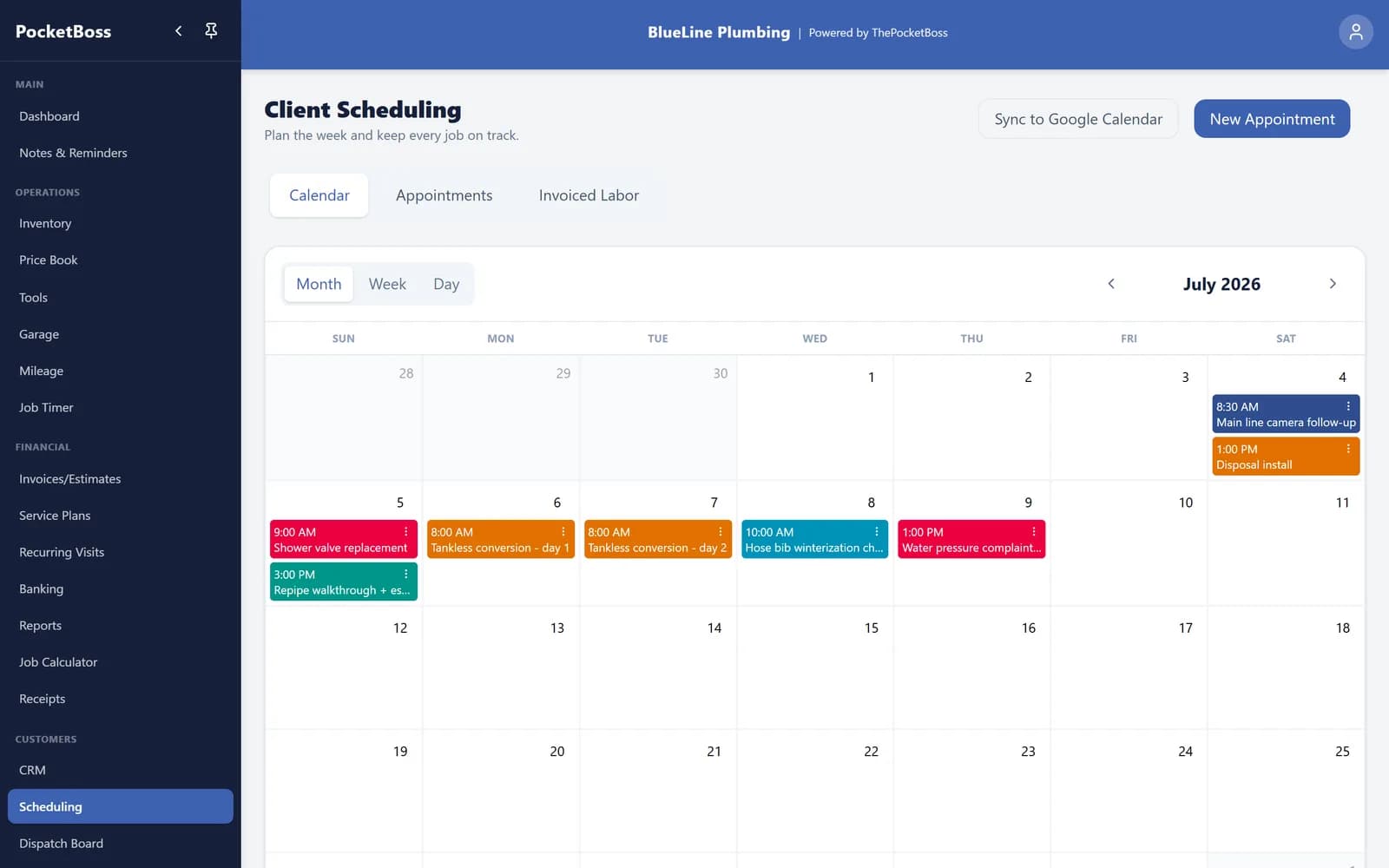
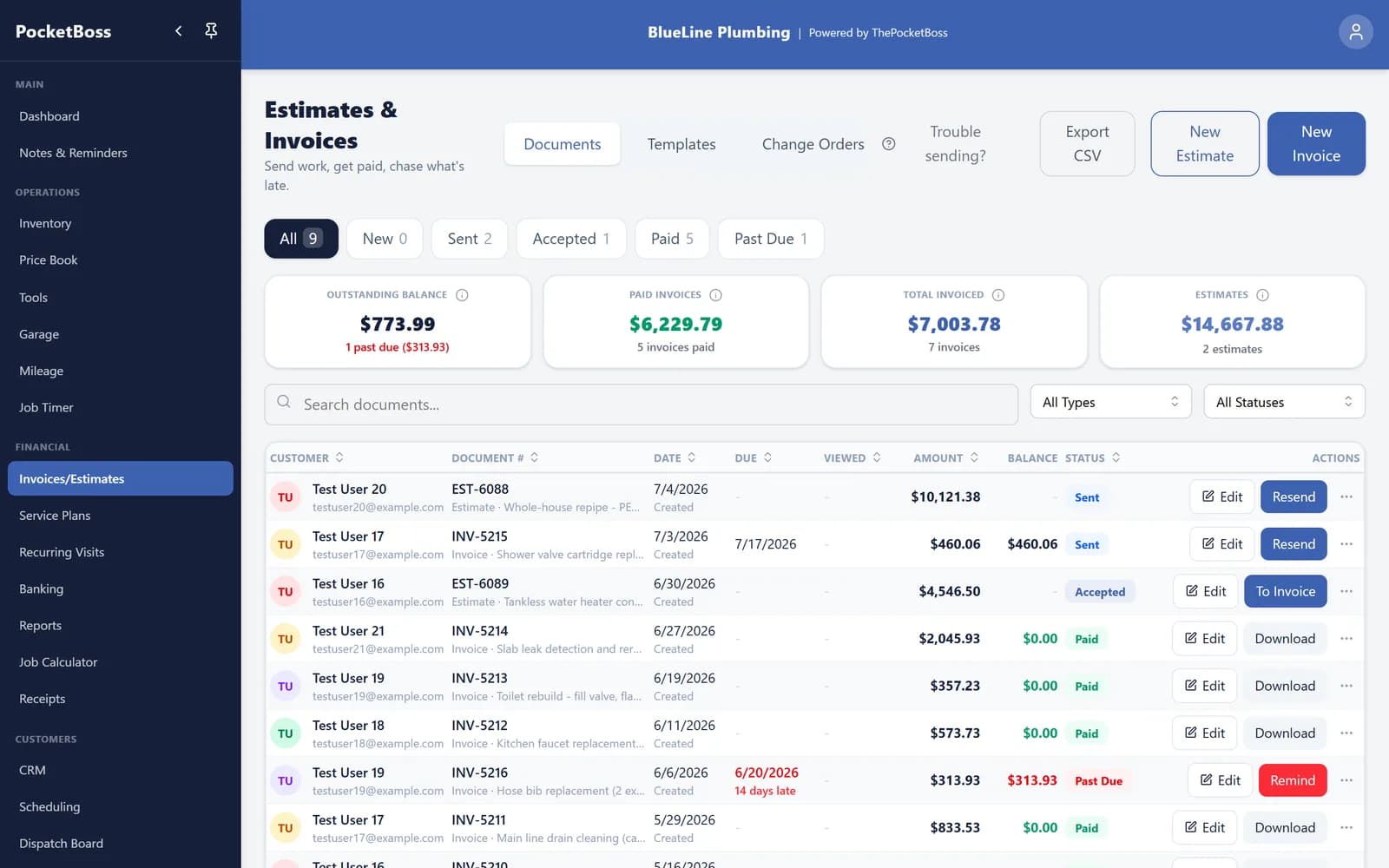
A leaking 50-gallon tank, followed from the phone call to the warranty reminder. The screenshots come from a demo plumbing account with fictional customers.
1. Book and dispatch
Find or add the customer and put the call on the calendar. On Essentials and up it lands on the dispatch board; drag it to the plumber with the right truck, and they get a text and an email. The customer gets an on-my-way text when the plumber heads out.
2. Check the old tank
The plumber opens the job in the iPhone or Android app, takes photos of the leak and runs the job timer. The old tank's make, model, serial and install date are on the customer's equipment record in the web app.
3. Quote the replacement
Build the estimate from your Price Book: tank, expansion tank, valves and labor at your prices. On Pro, offer good, better and best tanks. The customer approves and signs in the portal on their phone.
4. Install, invoice, get paid
Convert the estimate to an invoice and text it with a pay link. With Deduct stock when invoiced on, the parts come off that truck. Record the new tank with its warranty end date, and the owner gets an email 30 days before it ends.
Where PocketBoss is not the right plumbing software
- No call-center or call-booking screen for a team of call takers.
- No payroll run or commission tracking. On Essentials and up, crew hours export as a payroll CSV for your payroll provider.
- No live GPS tracking. The time clock (Essentials and up) stamps a location on clock-in and clock-out when the employee allows it.
- No pre-built plumbing price book: you bring your own prices or import them from a CSV.
- Support is by email and setup is self-serve.
- Online payments run through US Stripe accounts in US dollars, so PocketBoss fits US-based businesses.
- Teams of 26 or more are on Enterprise, priced by quote instead of a checkout.
If two or more of these are deal-breakers, look at ServiceTitan (call booking, payroll, commissions) or FieldEdge (call booking, flat rate), or compare plans on the ServiceTitan alternative page.
How we compared plumbing software, and who wrote this
ThePocketBoss wrote this guide, and PocketBoss is one of the nine tools in it, so weigh our view with that in mind. This is not an independent review site and it has no star ratings.
We read each competitor's own pricing page on November 8, 2026 and wrote down only what it shows: plan names, monthly prices, users included, trials, and the plan each plumbing feature is listed on. We left out review scores, customer counts and claims we could not check on the vendor's page. PocketBoss details come from our current plan catalog and help center, including what PocketBoss does not do.
Want the product view instead of the comparison? See plumbing contractor software for how PocketBoss runs a plumbing company day to day.
What PocketBoss costs a plumbing company
Users are part of the plan price, and every self-serve plan is month to month after a 14-day trial. Card payments cost Stripe's processing fee plus a 0.5% PocketBoss fee (0.25% on ACH, capped at $25), taken from the payout.
| Plan | Price | Users | What it adds |
|---|---|---|---|
| Solo | $19.99/month | 1 user | Customers, estimates with e-signature, invoices and online payments, customer portal, calendar, jobs, recurring visits, service plans, inventory, price book, mileage and texting (50 text segments a month) |
| Essentials | $29.99/month | Up to 5 | Everything in Solo, plus: Dispatch board and crew assignments; Workforce time and GPS punches; Projects and job costing; Subcontractors by text link, no seats needed; QuickBooks Online sync; Online booking page; Receipts and expense records; Workflows and tasks; Reports (300 text segments a month) |
| Pro | $49.99/month | Up to 10 | Everything in Essentials, plus: Tiered and sectioned estimate templates; Smart routing; Advanced dashboard analytics; SMS campaigns (600 segments a month); Banking and reconciliation |
| Boss | $99.99/month | Up to 25 | Everything in Pro, plus: AI Receptionist with a dedicated local number; 100 AI Receptionist minutes a month included; 1,500 text segments a month |
| Enterprise | Contact us for pricing | 26 or more | Everything in Boss, with the users your team needs |
Plumbing software questions
What is the best plumbing software?
It depends on team size and the work. For a solo plumber or a crew of up to 25, PocketBoss covers service calls, truck stock, estimates, invoices and payments for $19.99 to $99.99 a month. Jobber and Housecall Pro publish prices from $29 and $59 a month. ServiceTitan and FieldEdge price by quote; ServiceTitan also lists payroll and commission tracking.
What is the best software for a solo plumber?
One you can run from the van without paying for seats you do not use. PocketBoss Solo is $19.99 a month for one user, month to month, with estimates, invoices, card payments, a Price Book, truck stock and customer equipment records. As listed in November 2026, Jobber Core is $49 month to month or $29 billed annually (Connect for 1 user, which adds QuickBooks Online sync, is $99 to $139), and Housecall Pro Basic is $79 monthly or $59 billed annually.
How much does plumbing software cost per month?
As listed on vendor pricing pages in November 2026: PocketBoss $19.99 to $99.99 (1 to 25 users), Jobber Core $29 to $49, Housecall Pro $59 to $329, Kickserv $60 to $199 and Service Fusion $208 to $627. ServiceTitan, FieldEdge and Workiz do not publish prices. Payment processing is separate from these subscription prices.
Which plumbing software publishes its prices?
Of the nine tools in this guide, PocketBoss, Jobber, Housecall Pro, Service Fusion, Kickserv and Knowify show prices on their pricing pages. ServiceTitan, FieldEdge and Workiz show Request Pricing and quote each company. PocketBoss also lists its card fee: Stripe’s fee plus 0.5%, taken from the payout.
Can plumbing software track parts on each truck?
PocketBoss can, on every plan. Each truck is an inventory location with a driver, items have reorder levels and barcodes, and with Deduct stock when invoiced turned on, the parts on an invoice come off that truck when the invoice is saved. PocketBoss does not guess which parts a plumber used.
Which plumbing software works with QuickBooks Online?
Most of them. PocketBoss sends invoices, their customers and payments one way to QuickBooks Online on Essentials and up. Jobber lists it on Connect, Housecall Pro on Essentials, Kickserv on Start, and Knowify and Workiz on every plan; FieldEdge lists QuickBooks Online and Desktop, and Service Fusion a QuickBooks integration on every plan. ServiceTitan's pricing page does not tie an accounting sync to a plan.
Can plumbing software run maintenance memberships?
Yes. In PocketBoss, a Service Plan sets the price (monthly, quarterly or yearly) and the visits included, on every plan, and Recurring Visits can invoice or charge the card on file when a visit is done. Housecall Pro lists recurring service plans on Max and Workiz lists service plans on Ultimate.
What should plumbing software include?
At minimum: scheduling with room for emergency calls, a price book with your own prices, truck stock, water heater and fixture records by address, estimates the customer approves online, invoices with card payments, memberships that bill themselves, and an accounting sync. Then check which of those sit on a higher plan.
Is PocketBoss cheaper than Jobber for a plumbing crew?
On published prices, yes. Users are part of each PocketBoss plan: $29.99 a month covers up to 5 users and $49.99 up to 10. Jobber Connect lists $149 to $199 a month for 5 users and $229 to $299 for 10. Jobber lists automated client reminders on Connect and job costing on Grow, so run one real service call in each before you choose.
Can PocketBoss handle a plumbing company with more than 25 people?
Yes. Enterprise is for teams of 26 or more: everything in Boss, with the users your company needs, priced for your team. Email [email protected]. PocketBoss still has no call-booking console, payroll or commission tracking, so a company that needs those inside the software should also look at ServiceTitan.
More for plumbing contractors
- Plumbing contractor softwareHow PocketBoss runs a plumbing company
- Plumbing dispatch softwareThe dispatch board for a crew
- Plumbing scheduling softwareCalendar, reminders and on-my-way texts
- Plumbing estimating softwareQuotes the customer signs online
- Plumbing invoicing softwareInvoices with a pay link
- Plumbing pricing guideSet prices for common jobs
- Plumbing profit marginsWhat a job really makes
- Jobber alternativesCost at 1, 5 and 10 users
- Housecall Pro alternativePlan by plan
- ServiceTitan alternativeFor a 1 to 10 truck shop
- How to start a plumbing businessLicenses, pricing and tools
- PocketBoss pricingPlans, users and payment fees
Sources
PocketBoss publishes this page and benefits if you become a customer. Competitor prices and plan features were read on the vendors' own public pages on November 8, 2026, in US dollars before tax, and change often; confirm them with each vendor before you buy. PocketBoss details come from the current plan catalog and product documentation.
- Jobber pricing
- Housecall Pro pricing
- ServiceTitan pricing
- FieldEdge pricing
- Workiz pricing
- Service Fusion pricing
- Kickserv pricing
- Knowify pricing
Read our editorial policy. Spot a mistake? Email [email protected] and we will fix it. Product and company names belong to their owners.

Run your next plumbing call in PocketBoss
Add one customer, their water heater and a service call, then send the invoice from your phone. If it fits, keep going; if not, cancel before the trial ends.
Credit card required to start. Month to month, cancel anytime.