Handyman Invoicing Software for Owner Operators
Last updated: August 27, 2026
Handyman invoicing software helps you turn completed work into an itemized bill, offer online payment options, and track what remains unpaid. Pair it with handyman estimating software to carry an agreed quote into the billing workflow.
Pocket Boss is built specifically for owner operators and small crews who need to bill fast, accept payments online, and keep cash flow predictable. No accounting degree required.
Best for:
- Solo handymen managing 20-50 small jobs per month
- Owner-operators who invoice from the job site
- Small crews (1-5) who want simple billing without office overhead
Get invoices out fast. From $19.99/mo (Solo, one user) to $99.99/mo (Boss, up to 25 users).
14-day free trial • No contracts • Cancel anytime
See Handyman Invoicing in Action
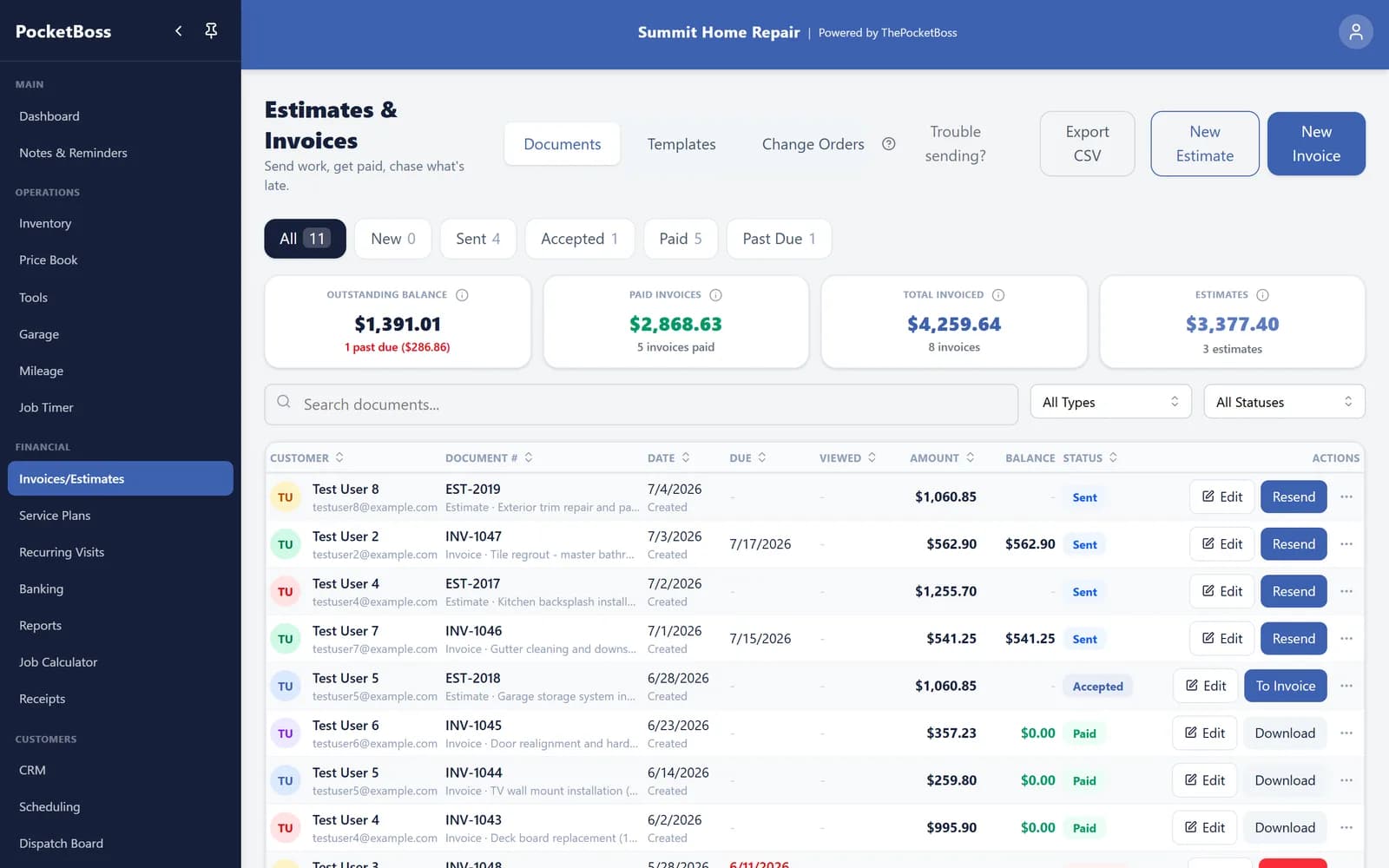
A real screenshot from the app: every estimate and invoice in one list, with payment status front and center.
Example: bill the completed repair, including an agreed change
Start with the $325 job in our handyman estimate example. Suppose the customer also approves an extra half-hour of work and $15 of hardware. Show those additions explicitly instead of sending an unexplained higher total.
- Original quoted work
- $325
- Approved additional labor: 0.5 hours × $80
- $40
- Approved additional hardware
- $15
- Invoice total before tax
- $380
- Payment received
- −$100
- Remaining balance in this example
- $280
These are illustrative charges, not recommended rates or a customer result. Tax is omitted; include any applicable tax before calculating an actual invoice balance. Record only payments received, and review processing status rather than treating a pending payment as settled.
In Pocket Boss, review the converted invoice, its dates, and its payment details before sending. Keep any agreed change with the job records, then use the invoice list to see what still needs attention.
Create Professional Invoices From the Job Site
After completing a job, you should be able to bill it immediately. With Pocket Boss you can create clean, professional, mobile-friendly invoices from anywhere.
Add Labor & Materials
Line items for time, parts, and markup — all in one invoice.
Markup & Tax
Review line-item pricing and applicable tax before sending the total.
Save Templates
Save invoice templates for repeat services to speed up billing.
Send Instantly
Email invoices or share a payment link right from the job site.
Accept Online Payments and Get Paid Faster
Share an invoice payment link so customers can review the amount and submit payment through the available methods. Check the payment status afterward: a submitted or pending payment is not the same as settled funds. For general contractor invoicing needs, see our contractor invoicing software page.
Credit card payments
Customers pay by card through Stripe directly from the invoice payment link.
ACH Direct Debit
Accept bank payments on larger jobs once Stripe activates ACH for your account. Lower fees than cards.
Online payment links
Share an invoice payment link so the customer can review the amount and available payment methods.
Customer portal access
Clients can view all invoices and make payments through their own portal.
Real-time payment tracking
See exactly which invoices are paid, pending, or overdue at a glance.
Online processing fees are separate from the subscription: Pocket Boss deducts 0.5% from card payments and 0.25% (capped at $25) from ACH payments from your payout, plus Stripe's processing fees. Nothing is added to the customer's invoice. See the full payment fee and timing disclosure.
Track Overdue and Outstanding Invoices Automatically
Review unpaid, overdue, and partially paid invoices together with their payment records. With overdue follow-ups enabled, Pocket Boss can email eligible unpaid invoices to customers with an email address. Follow-up does not guarantee payment. Use the contractor profit calculator to compare the job price with costs and overhead; invoice revenue is not the same as profit.
Optional overdue-invoice emails
Enable overdue follow-ups when appropriate, keep customer email addresses current, and review payment records before contacting someone about an outstanding balance.
Built Specifically for Handyman Workflows
Handyman businesses operate differently from large HVAC or plumbing companies. You handle many small jobs, repeat customers, and one-day projects. Your invoicing software should match that reality. See how invoicing fits into a complete handyman business software system.
What you handle
- Small repair calls
- Maintenance visits
- One-day projects
- Repeat customers
What Pocket Boss provides
- Fast invoice creation
- Simple service item tracking
- Job-to-invoice conversion
- Minimal admin overhead
If you are looking for a full business system, see our complete Handyman Business Software overview.
Check These Four Things Before Sending an Invoice
A clear invoice connects the agreed work, the amount due, and the next step for the customer.
Confirm the work billed
Match labor, quantities, materials, and agreed additions to the completed job. Explain any difference from the estimate.
Review the due date
Check the invoice date and payment terms after conversion. Do not assume the estimate and invoice use the same dates.
Check payments and balance
Account for payments actually received and inspect any pending transactions before sending a reminder.
Verify the recipient and payment setup
Confirm the customer details, available payment methods, and your processing-fee disclosure before sharing the invoice.
If you are evaluating alternatives, see our Jobber Alternative Guide.
Key Takeaways
- Create invoices quickly from the job site
- Accept credit card and ACH payments online
- Track unpaid and overdue invoices automatically
- Save service templates for repeat billing
- Convert estimates and review the resulting invoice
- Improve cash flow and reduce admin time
Looking for an all-in-one system? See our Handyman Business Software overview.
Frequently Asked Questions
What is the best invoicing software for handymen?
The best handyman invoicing software allows fast invoice creation, online payment acceptance, and automatic tracking of unpaid jobs without complex accounting tools. Look for software built for field contractors, not office-based businesses.
Can handyman invoice software accept credit cards?
Yes. Pocket Boss sends secure payment links so customers can pay an invoice by card through Stripe from their phone, or through their customer portal. ACH Direct Debit is available once Stripe activates it for your connected account.
What does it cost to accept online payments?
Pocket Boss plans start at $19.99 per month (Solo) and run to $99.99 per month (Boss). Online processing is separate: Pocket Boss deducts 0.5% from card payments and 0.25% from ACH Direct Debit payments (capped at $25), taken from your payout. Stripe also deducts its processing fees. Nothing is added to what your customer pays: a $1,000 invoice costs the customer $1,000.
Do I need separate accounting software?
Many handymen use invoicing software alongside accounting tools. Invoicing software handles job billing and payment tracking, while accounting software manages taxes and reporting. Pocket Boss covers invoicing, estimates, and payment tracking in one system.
How do I invoice work that changed after the estimate?
Review the additional work and price with the customer before adding it. Convert the estimate to an invoice, then check its line items, agreed changes, tax, due date, and payment details before sending. Keep the original scope and the customer approval with your job records.
How should I handle a partial payment?
Record the payment actually received and check the remaining balance. For an illustrative $380 invoice with $100 received, $280 remains due. A sent invoice or a payment still processing is not the same as money received. Review the payment status before following up.
Stop Chasing Payments
Create invoices quickly, accept online payments, track unpaid jobs, and improve your cash flow. Spend less time on admin and more time on the job.
Credit card required • Cancel anytime
Pricing and features may change. Online payment processing uses Stripe; Stripe fees, account approval, and payout timing apply. All trademarks are property of their respective owners. This page was materially reviewed on August 27, 2026.